

Understand credit allowances and resets
AI credits are shared by the workspace's websites. Workspace settings → Usage shows the available balance and the allowance information for your workspace.
Allowance, used credits and credits left
Free includes 100 AI credits per month, Basic includes 500, and Grow includes 1,500. Your workspace's allowance comes from its eligible grants or subscriptions for their current periods. Existing paid allowance periods keep their current grant; the updated amount applies from the next allowance period. Check Usage for your current balance and reset dates. Completed AI work consumes credits from the available balance.
The number of activity events is not the same as the number of credits used. Different AI operations can have different costs, so use the credit totals when checking consumption.
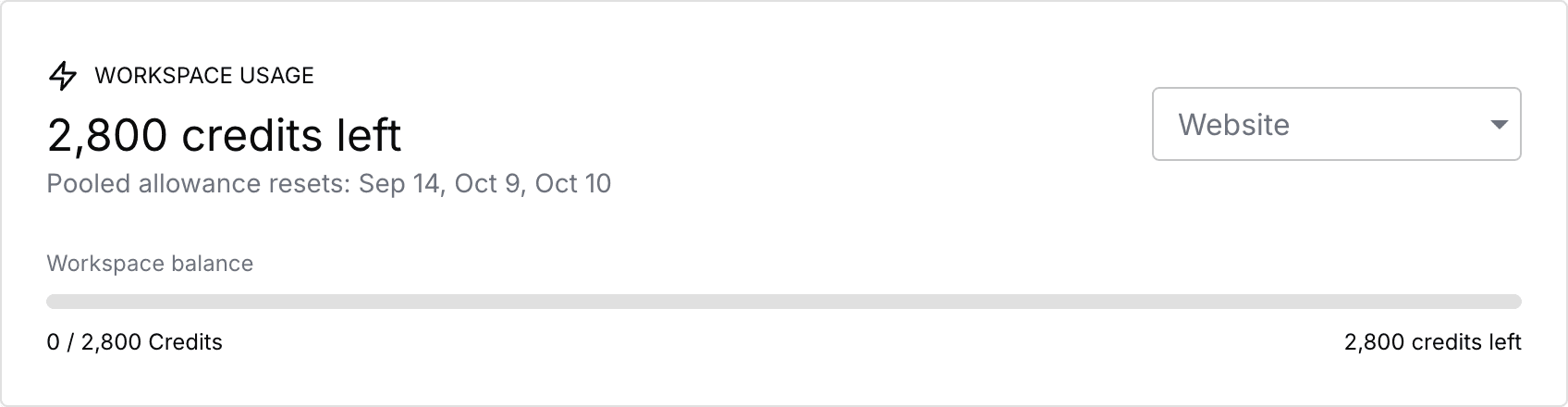
This screenshot is from an example workspace. Its numbers are not a promise of the allowance included with your plan.
How pooled allowances work
If more than one eligible subscription contributes credits, Pineapple combines the available credits for workspace use. Those subscriptions can still have different allowance periods and reset dates.
Use the dates shown in Usage to understand when each allowance changes. Do not assume every credit in the combined balance resets on one shared date.
Your subscription's payment schedule and the activity report's selected date range answer different questions. A report date filter does not change your subscription or grant a fresh allowance.
Website filters do not create separate balances
Selecting a website filters the activity you are reviewing. It does not give that website its own credit balance or limit the workspace balance to that site's activity.
To investigate unexpected usage, compare usage by website, usage by feature and recent events. Activity can include websites that have since been deleted.
If the balance or history looks wrong
Refresh Usage and use Retry if loading failed. An empty or failed activity list is not proof that no credits were used.
Check the selected workspace, the report's date range and any website filter. Then review subscription statuses. If the numbers still do not make sense, contact support with the workspace name and the period you checked.
Related: AI credits and usage · Manage subscriptions

